Know the target
Choose an inventory host or group, then resolve the actual destination before work begins.
REMOTE OPERATIONS, UNDER CONTROL
From the first target choice to the final evidence, VARSH connects the work your Linux and database teams do every day.
WHY VARSH
Infrastructure changes cross hosts, credentials, databases and maintenance windows. VARSH brings the target, the run and the result into one operational flow, with context for the person doing the work and the person reviewing it.
See the architectureChoose an inventory host or group, then resolve the actual destination before work begins.
Keep command, SQL, transfer, and scheduled work connected to the same controller and inventory.
Review outcomes and supporting evidence after a run, including per-host results.
THE PLATFORM IN MOTION
Move through the parts of VARSH that turn remote operations into a planned, reviewable process.
Organize hosts and groups, choose a controller and resolve the exact destinations before a run.
Run commands and scripts against selected hosts with preflight checks, bounded execution and per-host results.
Work with MariaDB and MySQL targets from the selected controller and explicit inventory context.
Stage a file, verify its checksum and record a separate transfer result for each target.
Set one-time or recurring jobs, preview upcoming runs and review execution history.
Opt-in remote access connects an approved operator to the Desktop workspace through a separate relay path.
Policies, change references, risk checks and precise target selection shape an operation before execution.
Core-side checks, strict SSH host-key verification and native Windows credential handling support controlled access.
Distinct execution IDs, per-host outcomes and audit records make follow-up less dependent on memory.
The companion is being built for enrolled owner review. A configured app and real-device approval are still pending; phone control is not available today.
HOW IT WORKS
A focused path for an operator, with context a reviewer can understand later.
Pick the controller and the inventory host or group for the job.
Resolve destinations, routes, access, and the run settings before acting.
Execute a command, SQL task, file transfer, or scheduled job with bounded behavior.
See outcomes by target and retain the evidence for follow-up.
ARCHITECTURE
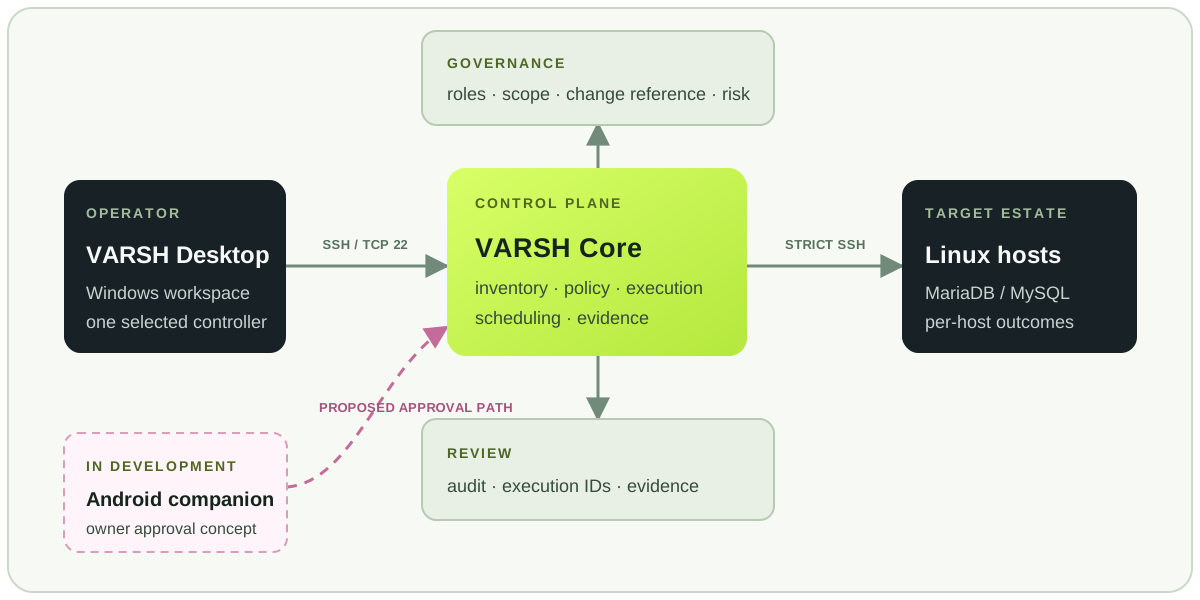
Desktop gives the operator a workspace. Core resolves targets, applies controls and records the result close to the estate. The companion path is shown as a development direction.
Swipe to explore the diagram →
GOVERNANCE + SECURITY
Control points surround the run, from target resolution through the evidence left behind.
Selected groups resolve to named hosts before execution, limiting ambiguity about the blast radius.
Controller-side permission and risk checks govern actions; the Desktop view is not the enforcement boundary.
Target SSH requires strict host-key checking. Desktop uses native Windows credential handling for saved target access.
Execution IDs, per-host results and audit records support investigation and handoff.
WHAT'S NEXT
The Android companion is being developed as an enrolled, narrow approval surface. Core remains the decision point; phone registration, a configured APK and real-device acceptance have not yet been completed.
Android companion · in development VARSHCOMPANION
Review the requested controller and scope before deciding.
LET'S TALK
Tell us about the Linux and database work your team manages. We’ll discuss the workflow, deployment approach and the capabilities that matter to you.
Email the VARSH team with a few details about your environment and the work you want to simplify.
Contact usnishol@live.comYour email app will open. No information is submitted through this site.